
Google Chrome’s platform has spawned a new generation of essential, optimized tools – Chrome extensions. As the web swiftly evolves to reshape user demands, customized experiences are now non-negotiable. With over 2 billion users, Google Chrome is the world’s most popular browser due to its speed, security, and extensive library of enhancements
Savvy Chrome users are turning to browser extensions to customize their experiences for peak productivity. While many provide niche functions, a few must-have extensions deserve permanent placement to optimize all users’ online experiences.
With the help of these chrome extensions you can now focus attention on actual content instead of wrestling with the sea of content during your web surfing
1. Microsoft Autofills- Streamlining Form Entries
Microsoft Autofill is a powerful extension designed to enhance your online experience by securely saving and auto-filling your passwords, addresses, and payment information. Available on Windows, macOS, Android, and iOS devices, this extension ensures a seamless and convenient browsing journey.
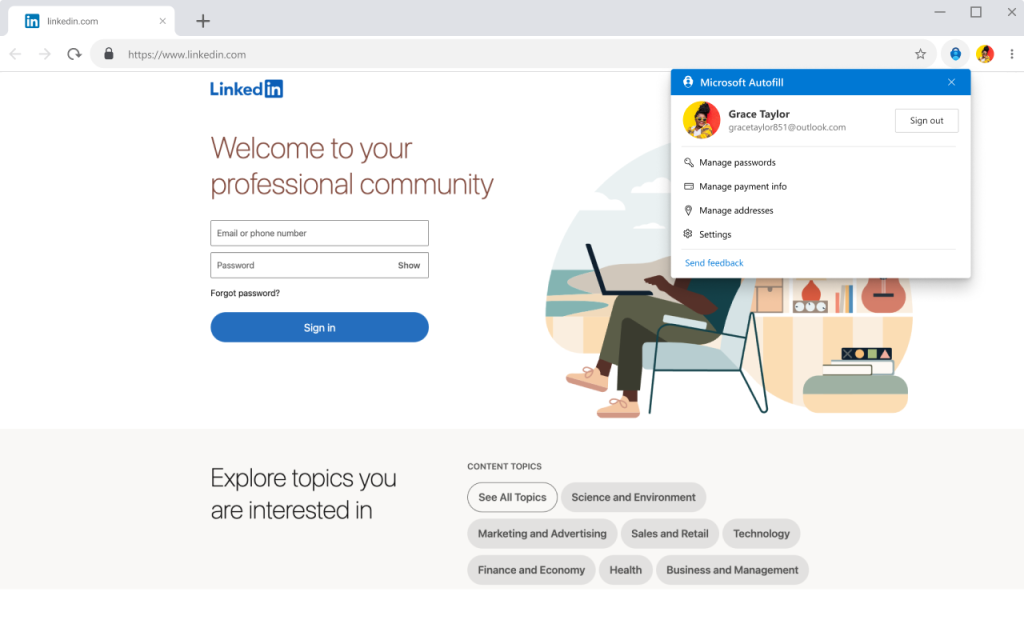
Key features of Microsoft Autofill include:
Effortless Data Management: Say goodbye to the hassle of forgetting passwords and other crucial information. Microsoft Autofill securely stores them online, allowing easy access whenever needed.
Time-Saving Autofill: Save valuable time by letting Microsoft Autofill automatically populate passwords, addresses, and payment details on the websites you visit. No more manual data entry, just swift and accurate autofill.
Cross-Device Accessibility: Enjoy the flexibility of accessing your saved passwords and addresses across all your devices, ensuring a consistent and personalised online experience.
For Microsoft Edge users, Microsoft Autofill is seamlessly integrated into the browser settings. If you’re using Google Chrome, this extension is readily available. For mobile autofill on Android and iOS, simply download the Microsoft Authenticator app. Streamline your online interactions with Microsoft Autofill, simplifying and securing your digital journey.
2. Todoist – Chrome Extensions

With 25 million people relying on Todoist for project management, it has been named “the best to-do list right now” by The Verge. Embrace productivity and organisation.
Key Features of Todoist for Chrome:
Task Integration with Websites: Transform websites into actionable tasks effortlessly. Add articles to your reading list, save wishlist items, or note down work tasks for future follow-up.
Day Planning Simplified: Plan your day seamlessly by organising tasks directly from the Chrome extensions. Streamline your to-do list for enhanced productivity.
Browser-Based Task Completion: Complete tasks without disrupting your workflow. Check off accomplished tasks directly from the browser, eliminating the need to switch contexts.
Integrate and Streamline: Benefit from over 60 app integrations, including Google Drive, Dropbox, Zapier, Evernote, and Slack. Todoist becomes your central hub for organising both work and life.
3. Keyword Surfer- Surfing the SEO Waves
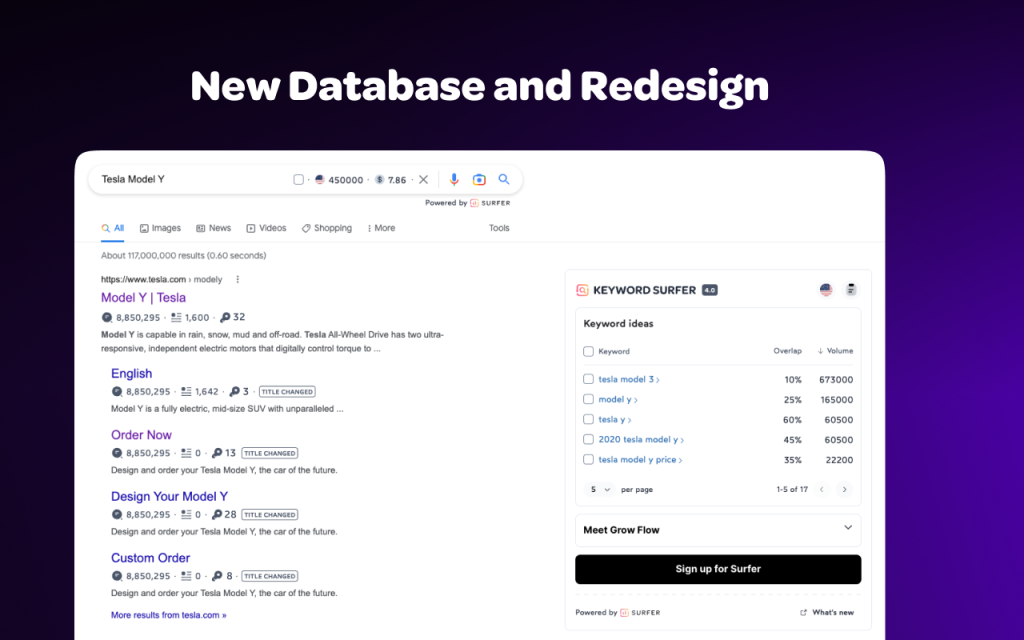
Discover the power of efficient keyword research directly within your Google search results using Keyword Surfer. This user-friendly extension empowers you to generate keyword ideas and unveil critical insights without leaving the search page.
Key Features:
Real-time Search Volume: Instantly access search volume data for relevant keywords as you conduct new searches on Google.
Comprehensive Data Insights: Gain valuable information, including CPC, keyword suggestions, related terms, visibility metrics, and on-page data, all at a glance.
Effortless Keyword Collections: Create personalized keyword collections to bookmark important terms directly within the extension. Say goodbye to the hassle of searching them separately each time.
Export Functionality: Export your keyword collections seamlessly as .csv files whenever you need them, ensuring easy accessibility and sharing.
Efficiency Redefined: Streamline your content creation research process without ever leaving the Google results page, saving time and boosting productivity.
4. Grammarly- A tools for browsing Writing styles
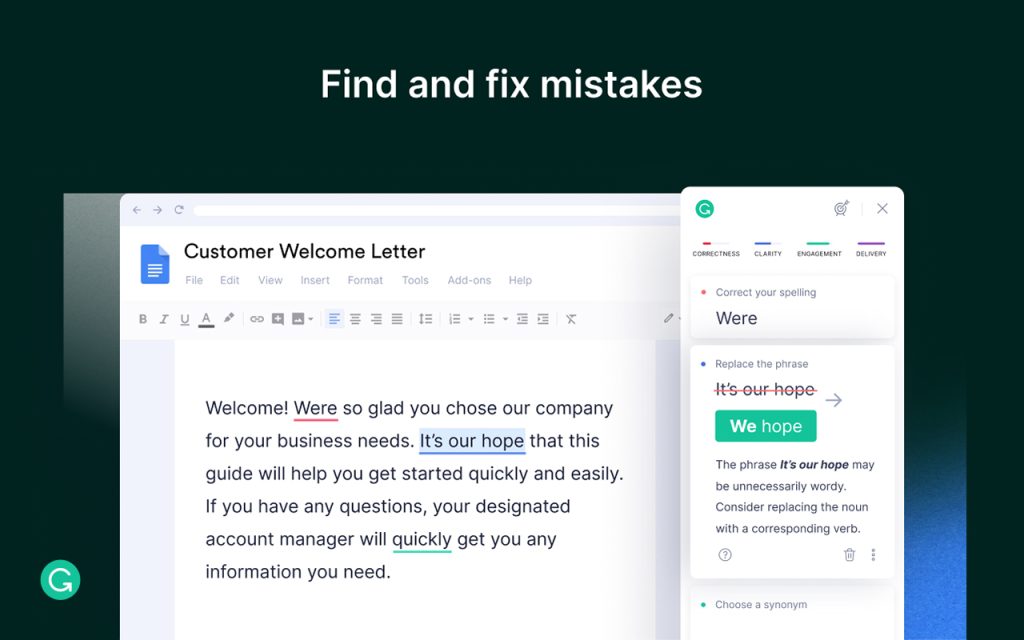
With Grammarly for Chrome extensions, a multipurpose writing assist that goes beyond standard proofreading, you can unleash the potential of successful communication. With its seamless integration into your browser, Grammarly ensures that your online writing is flawless by providing real-time comments on spelling, grammar, punctuation, clarity, and writing style.
Key Features:
Comprehensive Writing Assistance: Receive feedback on spelling, grammar, punctuation, clarity, and writing style, making Grammarly more than just a proofreader.
Generative AI Capabilities: Harness the power of generative AI to produce contextually relevant drafts, ideas, replies, and more on demand, enhancing your writing creativity.
Terms and Conditions: Review and acknowledge the terms and conditions before installing as chrome extensions to ensure a transparent and secure user experience.
Colour-Coded Suggestions: Grammarly analyses your sentences in real-time, providing colour-coded underlines to highlight areas for improvement. Apply suggestions with a single click or explore them for deeper insights.
Advanced Spelling and Grammar Checker: Detect misspellings, commonly confused words, and complex grammar and punctuation issues, elevating your writing beyond standard word processors.
Beyond Grammar: Streamline wordy phrases, rewrite confusing sentences, and receive word choice improvements to keep your readers engaged. Adjust your tone for the desired impact.
For Students: Access the free beta auto-citations feature, generating citations for online sources effortlessly, supporting APA, MLA, or Chicago formatting.
5. Meet Perplexity- Your AI Companion

Have you ever found yourself trapped in a sea of open tabs while trying to find a solution? Perplexity is the ideal combination of ChatGPT and Google, ready to become your go-to information partner right away.
Key Features:
Instant Page Summaries: Decode articles and webpages effortlessly with concise summaries, providing clarity at a glance.
Quick Queries: Ask any question directly from your toolbar, eliminating the need to switch between multiple tabs for information.
Contextual Understanding: Enjoy answers tailored to your current page or domain, ensuring relevance and precision in every response.
Shareable Insights: Easily share your newfound knowledge with others through a clickable link, fostering seamless collaboration.
Dynamic Conversations: Click to ask follow-up questions, initiating dynamic conversations for a deeper understanding of your queries.
The combined effect of these Chrome extensions add ons greatly improves the technique of seamless internet browsing. We create the conditions for an efficient online experience by pushing people to experiment with and incorporate these technologies.
Adopting state-of-the-art technology is essential to streamlining and improving the digital experience, making sure that every online exchange is not only productive and efficient but also a source of increased happiness. With these helpful tools for browsing, you may enhance your experience and create an even more delightful digital environment.