
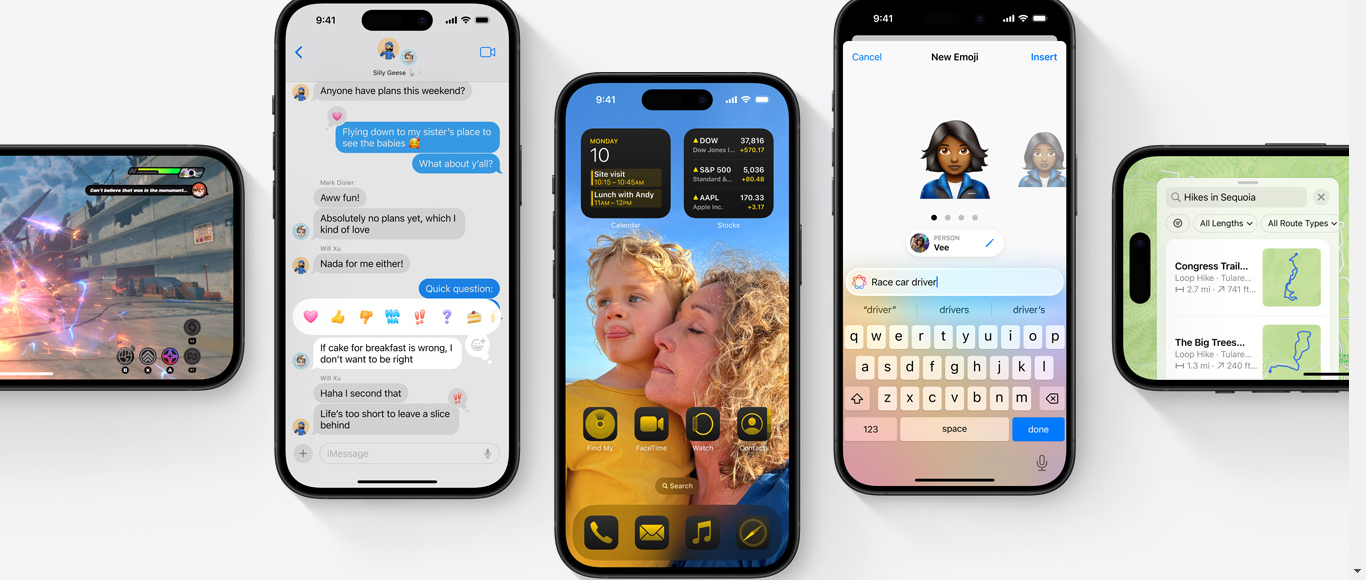
Buckle up because we’re about to take a deep dive into the freshest, crispiest apple in the orchard – Apple iOS 18. This isn’t just any old update; it’s a game-changer that’s about to revolutionize the way we interact with our beloved iPhones. So, grab your virtual hardhats, and let’s explore this digital wonderland!
The Control Center: Your New Command Hub
Let’s kick things off with the Control Center – the nerve center of your iPhone’s operation. Apple iOS 18 has given it a complete makeover, and boy, is it a sight for sore eyes! Gone are the days of the single pull-down page. Now, we’re talking about a multi-page extravaganza that puts you in the driver’s seat.
Imagine having two new controls that you can move around like pieces on a chessboard. It’s like having your own personal DJ booth, but instead of mixing tracks, you’re mixing your Apple iOS 18’s functions. And that’s not all – swipe up, and you’ll find yourself in a world of media playback options and network settings. It’s like having a Swiss Army knife, but for your digital life.
But wait, there’s more! The number of pages in the Control Center adapts to your needs. Got music playing in the background? Boom! A new page appears, giving you quick access to those sweet, sweet tunes. It’s like your iPhone is reading your mind, but in a cool, non-creepy way.
Widgets and Icons: The Customization Revolution
Now, let’s talk about widgets and icons. Apple iOS 18 is finally letting us unleash our inner interior designers on our home screens. You can now place app icons and widgets wherever your heart desires. Well, almost. There’s still an underlying grid, so you can’t put that Weather widget smack in the middle of your screen. But hey, baby steps, right?
And for all you color enthusiasts out there, get ready to go wild! You can now customize icon size, toggle between dark and light modes, and even add tints. It’s like painting, but instead of a canvas, you’re working with pixels. Just a word of caution – finding the perfect tint can be trickier than finding a needle in a haystack. But hey, that’s half the fun!
The Password Manager: Your Digital Bodyguard
In this age of endless passwords and security breaches, Apple iOS 18 is stepping up to the plate with a dedicated password manager app. Think of it as your own personal, digital Fort Knox. It stores all your passwords and passkeys, keeping them safe from prying eyes.
But it’s not just a storage unit. This app is smart. It’ll give you a heads up if any of your passwords have been caught in data leaks or if you’ve been a bit too lazy and reused passwords across multiple sites. It’s like having a tiny, digital security guard in your pocket, always on the lookout for potential threats.
The Notes App: Your Personal Math Genius
Remember those days when you had to switch to the calculator app to solve equations? Well, those days are officially over. With Apple iOS 18, the Notes app is getting a serious IQ boost. Now, you can write math equations directly in your notes, and voila! The app solves them for you, displaying the result in your own handwriting. It’s like having a math genius at your beck and call, 24/7.
But here’s the catch – this feature is exclusive to the iPhone 15 Pro models. So, if you want to channel your inner Einstein, you might need to consider an upgrade.
The Flashlight: Lighting Up Your World
Who would have thought that a simple flashlight could get an upgrade? Well, Apple did. In Apple iOS 18, you’re not just controlling the intensity of your flashlight anymore. Oh no, you’re now the master of width and focus too. It’s like having a mini spotlight in your pocket. Whether you need a narrow beam to find that earring you dropped or a wide spread to light up your campsite, your iPhone’s got you covered.
Apple Intelligence: Your AI Friend
Now, let’s talk about the elephant in the room – Apple Intelligence. This is where things get really exciting. Apple iOS 18 is introducing AI features that promise to revolutionize how we interact with our devices. While these features are still in beta and not available in the current public release, they’re set to hit our iPhones later this year.
Imagine having an AI assistant that truly understands your personal context, providing intelligence that’s tailored specifically to you. We’re talking about AI that can help with writing, focusing your attention, and enhancing your communication. It’s like having a personal assistant, therapist, and writing coach all rolled into one.
But that’s not all. Apple Intelligence is also set to bring some serious creativity to the table. Want to create unique images to express yourself? Done. Need a custom Genmoji for your conversations? No problem. Feeling nostalgic? It’ll even create memory movies for you. It’s like having a miniature Hollywood studio in your pocket.
And let’s not forget about Siri. Our old friend is getting a major upgrade, with richer language understanding and awareness of your personal context. It’s evolving from a simple voice assistant to a truly intelligent companion.
A Bite Worth Taking
So, there you have it, folks – a whirlwind tour of Apple iOS 18. From the revamped Control Center to the AI-powered features on the horizon, this update is packed with goodies that are sure to delight iPhone users.
While some of the customization options might be hit or miss depending on your personal taste, the overall package is undeniably impressive. The updated Calculator, the new password manager, and the promise of Apple Intelligence make this an update you won’t want to miss.
Of course, as with any major update, it’s always wise to wait for the official release and maybe even a point update or two before jumping in. But when it does hit your iPhone, get ready for a whole new world of possibilities.
In the grand orchard of mobile operating systems, Apple iOS 18 is shaping up to be one juicy, feature hand-packed apple. So, get ready to take a big bite out of this latest offering from the tech giant.
Because Apple iOS 18 will make your life all beer and skittles!